

Game Project
GearShift
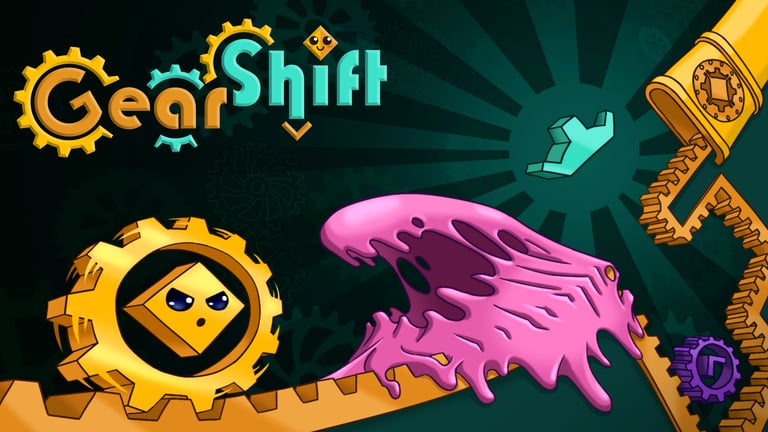
My first game project. This was done for a prototyping class. We had 2 weeks for each project, each with its own set of constraints, and this was our very first one. For this we had to make a single-button game, so we chose a simple puzzle-platformer. To try and differentiate from every other one out there, we went with a gravity shifting mechanic. Although nothing very technically impressive goes on in this project, I wanted to share to show my approach to making the gravity shift mechanic and also my first attempt at using touch controls for mobile devices (although, it is simply one button, which made it easier to implement).
Character Controller (PlayerController.cs)
The game has automatic movement, and the single button is simply used to jump. So the majority of the logic is surrounding the gravity mechanic, and changing the variables according to its direction, which is changed whenever the player collides with specific objects in the levels.
Below is a quick video of the gravity shift mechanic in action, before I share the code.
private void Update ()
{
// This first line checks if the gravity is on either wall to change between vertical (Y axis) or horizontal (X axis) movement
rb.velocity = isOnSides ? new Vector2(rb.velocity.x, moveSpeed * Time.fixedDeltaTime) : new Vector2(moveSpeed * Time.fixedDeltaTime, rb.velocity.y);
// Although it's a simple game, I added a couple of the mechanics that improve the feel of the controller. The first being coyote time, which still recognizes the jump input a few moments after the character left the ground.
if (isGrounded)
{
coyoteTimeCounter = coyoteTime;
}
else
{
coyoteTimeCounter -= Time.deltaTime;
}
// This is the input detection for touch screens
if (Input.touchCount > 0)
{
Touch touch = Input.GetTouch(0);
if (touch.phase == TouchPhase.Began)
{
// The second mechanic is the jump buffer, which detects the jump input even if the player presses it slightly too early, before the character was back on solid ground.
// Adding both of these makes the controller feel more responsive, even though, technically, the player is pressing the input at the wrong times
jumpBufferCounter = jumpBufferTime;
}
else
{
jumpBufferCounter -= Time.deltaTime;
}
if (touch.phase == TouchPhase.Began && rb.velocity.y != 0f)
{
coyoteTimeCounter = 0f;
}
}
// Finally, if both jump buffer and coyote timer are counting down, that's when we let the character jump
if (jumpBufferCounter > 0f && coyoteTimeCounter > 0f)
{
rb.velocity = jumpDirection * jumpForce;
jumpBufferCounter = 0f;
}
// These lines, with the following if statement are used to detect frontal collisions and invert the movement
Vector2 inFront = transform.right * sideFacing;
RaycastHit2D hit = Physics2D.Raycast (transform.position, inFront, characterRadius + 0.01f, Ground);
if (hit.collider != null)
{
Flip();
moveSpeed = -1;
}
}
// Here I change the gravity according to which of the objects the player has collided with
private void OnTriggerEnter2D(Collider2D other)
{
if (other.gameObject.CompareTag("GravityUp") && gravity != Gravity.Up)
{
// In a few cases, I also have to flip the sprite so the movement and orientation flow correctly
if (gravity == Gravity.Down || gravity == Gravity.Right)
{
Flip();
}
ChangeGravity(Gravity.Up);
isOnSides = false;
}
if (other.gameObject.CompareTag("GravityDown") && gravity != Gravity.Down)
{
if (gravity == Gravity.Up || gravity == Gravity.Left)
{
Flip();
}
ChangeGravity(Gravity.Down);
isOnSides = false;
}
if (other.gameObject.CompareTag("GravityRight") && gravity != Gravity.Right)
{
if (gravity == Gravity.Up || gravity == Gravity.Left)
{
Flip();
}
ChangeGravity(Gravity.Right);
isOnSides = true;
}
if (other.gameObject.CompareTag("GravityLeft") && gravity != Gravity.Left)
{
if (gravity == Gravity.Down || gravity == Gravity.Right)
{
Flip();
}
ChangeGravity(Gravity.Left);
isOnSides = true;
}
}
// The flip simply modifies the local scale and inverts the side facing variable, used above in the frontal collision detection
private void Flip()
{
transform.localScale = new Vector2(-transform.localScale.x, transform.localScale.y);
sideFacing *= -1;
}
enum Gravity
{
Up,
Down,
Left,
Right
}
// And here we have the method responsible for actually modifying the game's gravity, and all appropriate values necessary to keep the character's movement consistent
private void ChangeGravity(Gravity dir)
{
switch (dir)
{
case Gravity.Up:
gravity = Gravity.Up;
Physics2D.gravity = new Vector2(0f, -gameGravity);
transform.eulerAngles = new Vector3(0, 0, 180f);
jumpDirection = Vector2.down;
break;
case Gravity.Down:
gravity = Gravity.Down;
Physics2D.gravity = new Vector2(0f, gameGravity);
transform.eulerAngles = Vector3.zero;
jumpDirection = Vector2.up;
break;
case Gravity.Left:
gravity = Gravity.Left;
Physics2D.gravity = new Vector2(gameGravity, 0f);
transform.eulerAngles = new Vector3(0, 0, -90f);
jumpDirection = Vector2.right;
break;
case Gravity.Right:
gravity = Gravity.Right;
Physics2D.gravity = new Vector2(-gameGravity, 0f);
transform.eulerAngles = new Vector3(0, 0, 90f);
jumpDirection = Vector2.left;
break;
}
}
